
Why Your Next Trip Needs a Digital SIM
Your Ultimate Guide to Staying Connected with a Travel eSIM
A travel eSIM is a digital SIM card that lets you activate a mobile data plan without needing a physical card. It works by downloading a profile onto your eSIM-compatible device before or during a trip, instantly connecting you to local networks abroad. The key benefit is seamless global connectivity without swapping SIMs, roaming fees, or hunting for physical SIMs at airports. To use it, simply purchase a plan online, scan a QR code to install, and manage data directly from your phone’s settings.
Why Your Next Trip Needs a Digital SIM
For your next trip, a digital SIM (eSIM) eliminates the hassle of physical SIM cards, allowing you to connect the moment you land. You skip searching for local vendors or dealing with expensive roaming plans, as you can purchase and activate a travel eSIM online before departure. This means instant, reliable connectivity for maps, ride-sharing, and communication without swapping cards.
The core advantage is freedom: keep your primary number active while using a separate local data plan, avoiding bill shock.
It also lets you easily top up or switch plans mid-trip if your needs change, ensuring you remain online where and when you need it most.
What a virtual SIM does differently than plastic cards
A virtual SIM eliminates the physical swapping and storage of plastic cards. Instead of removing your home SIM to insert a foreign carrier’s card, you download a digital profile that overlays your existing connection. This means you keep your primary number active for calls or texts while simultaneously using the travel eSIM’s data plan. Crucially, a virtual SIM enables instant switching between providers without needing a new digital SIM profile—you simply select a different plan via an app, whereas a plastic card requires physically ejecting and replacing the chip. There is no risk of losing a tiny card, and you can pre-load multiple travel profiles before departure.
A virtual SIM removes the physical swap, allows dual-line use, and lets you switch carriers instantly, unlike plastic cards that require manual replacement and carry a risk of loss.
The hidden costs of roaming that vanish instantly
Roaming masks unpredictable expenses like per-megabyte overage fees after a daily data cap, or punitive rates for receiving calls in a foreign country. A digital SIM eliminates these instantly by replacing the carrier’s wholesale billing with a single, upfront local data plan. You never face a surprise bill for background app sync or an accidental video call, as the eSIM operates on prepaid credit with a hard stop. The hidden cost of “free” incoming texts also vanishes, since a data-only eSIM bypasses voice/SMS surcharges entirely.
With a digital SIM, hidden roaming overage fees and per-service surcharges disappear, replaced by transparent, prepaid data that cannot accrue unexpected charges.
How one eSIM replaces a pocket full of local SIMs
Instead of juggling a dozen tiny plastic SIMs from past trips—each with its own expiry, country code, and awkward prying tool—you load a single digital travel SIM before you even board. That one profile holds all your regional or global data bundles. Hop from France to Japan? You don’t swap cards; you just select the next plan via an app. Your phone number stays active for calls, while the eSIM handles data across borders. No more dropping a SIM in a train seat or losing that adaptor. It’s one digital chip doing the work of an entire wallet’s worth of plastic.
Picking the Right Data Plan for Your Journey
Picking the right data plan for your journey starts with matching the travel eSIM to your specific itinerary. For a multi-country trip, choose a regional plan covering all destinations instead of stacking local eSIMs. Prioritize plans with high-speed data caps that suit your usage, whether for navigation or streaming. Always verify that the eSIM supports tethering if you need hotspot access, as some budget plans disable this feature. Check the plan’s validity period against your travel dates to avoid paying for unused days. By selecting a data package calibrated to your real needs, you ensure seamless connectivity without overpaying for unnecessary volume.
Regional bundles vs single-country coverage
Choosing between a regional bundle and single-country coverage hinges on your itinerary’s density. A regional eSIM, like one covering the EU or Asia, offers seamless connectivity across borders, ideal for multi-stop trips where you avoid re-purchasing for each nation. Single-country plans, however, often provide faster local speeds and lower per-GB costs if you are staying put. For a traveler bouncing between Paris, Brussels, and Amsterdam, regional travel eSIM flexibility outweighs minor savings. Conversely, a two-week stay in Japan favors a single-country plan for its superior network priority.
How do I decide if a regional plan covers my stops? Check the eSIM provider’s exact country list before buying—a “Europe” bundle may exclude non-EU nations like Switzerland or Turkey, forcing a separate single-country purchase.
Unlimited data offers vs high-speed capped options
When selecting a travel eSIM, choose between unlimited data offers and high-speed capped options based on your usage. Unlimited plans often throttle speeds after a preset threshold, making them suitable for casual browsing and messaging, but unreliable for video calls. High-speed capped plans provide full LTE/5G speeds until you exhaust the data allowance, ideal for navigation and streaming. For heavy use, a capped plan with a generous allowance often outperforms an unlimited plan with severe throttling.
Q: When should I pick unlimited over high-speed capped for travel? A: Choose unlimited if you need constant social media and email but can tolerate slower speeds, and select high-speed capped if you rely on fast navigation, video conferencing, or tethering.
Duration tricks: short hop, long stay, and multi-destination passes
Duration tricks involve matching your eSIM’s validity to your specific travel pattern. A short-hop pass suits a weekend city break, activating for 3–7 days with generous high-speed data. For longer stays, a long-stay plan typically runs 15–30 days, offering reduced daily rates and high data caps. Multi-destination passes let you hop between countries without purchasing separate eSIMs, often including a shared data pool valid across regions for 10–30 days. Always check that the pass covers your exact countries and duration, as unused days rarely roll over.
Activating the Connection Before You Land
Activating the connection before you land with a travel eSIM means installing and configuring the digital profile while still on Wi-Fi at your departure point. This pre-landing activation ensures your phone is ready to latch onto a local tower the moment your plane touches down, bypassing the need for airport hotspot hunting or SIM swaps. The key advantage is seamless transition: you deplane with live data for maps, rideshares, and messaging without any delay.
Install the eSIM profile while connected to home Wi-Fi, then toggle cellular roaming on only after your arrival gate opens to avoid unintended charges.
Always verify the eSIM’s “activation window” in its app—some require manual start, while others auto-activate upon reaching the destination network, so plan accordingly to guarantee instant connectivity.
Scan, install, and arrive online instantly
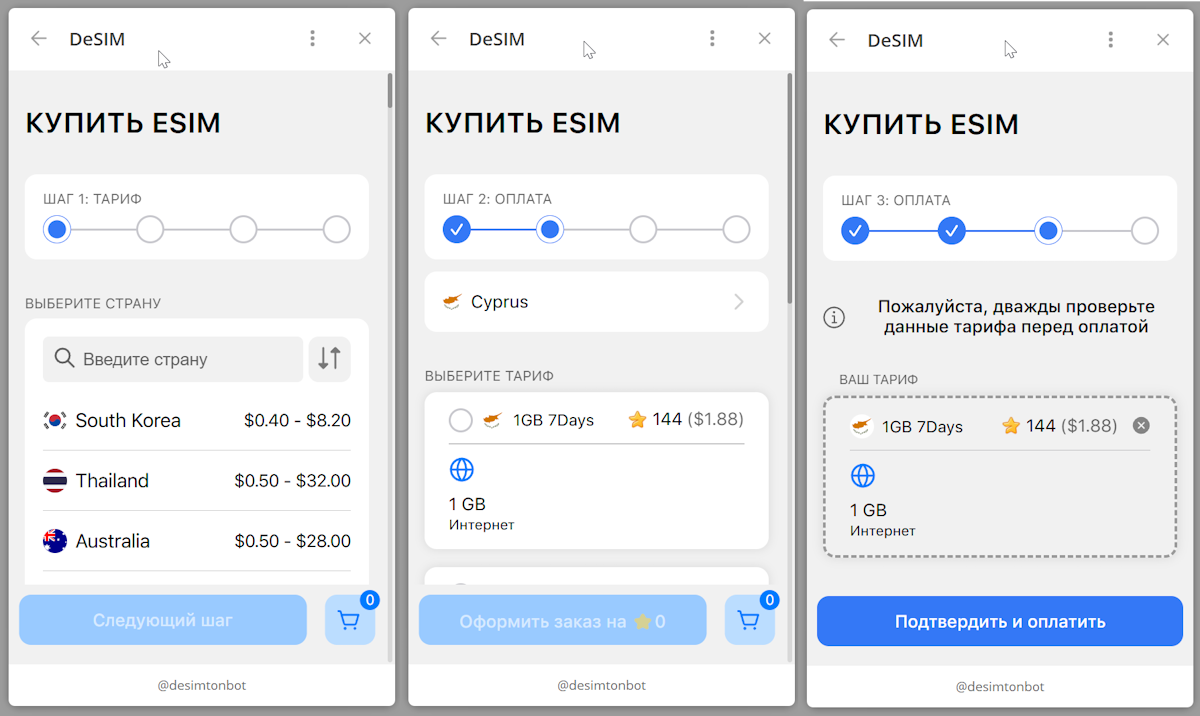
Activating your travel eSIM before departure lets you arrive online instantly. You simply scan a QR code sent via email, install the profile in your device settings, and the connection activates immediately—no physical SIM swap or store visit needed. This pre-boarding step eliminates airport Wi-Fi hunting and delayed activation.
- Scan the eSIM QR code from your confirmation email while still at home.
- Install the profile with one tap in your phone’s cellular settings.
- Select the eSIM line for data and turn on roaming to go live.
- Land with active data—no searching for local SIMs or public networks.
Managing multiple profiles without juggling trays
Juggling physical SIM trays while traveling is a hassle, and managing multiple profiles with a travel eSIM solves this neatly. You can store several eSIM profiles on your device, switching between them from your settings menu without touching any hardware. This means you keep your home number active for banking codes while using a local data plan for maps, all in a few taps. Just label each profile clearly—like “Japan Data” or “Home Line”—so you never guess which one to use. Switching eSIM profiles instantly lets you jump between networks for better coverage or cheaper rates, all without fishing for a SIM ejector tool.
What happens when your phone has no physical slot
When your phone lacks a physical SIM slot, you activate your travel eSIM entirely through software. You scan a QR code or download a carrier app before departure, then install the eSIM profile in your device’s settings. This makes eSIM activation before landing essential—you connect to a local network immediately upon arrival without needing to locate a physical store or swap cards. The process involves no hardware insertion: you simply select the new line in your cellular menu. No physical slot means you can store multiple eSIM profiles and switch between them as needed, though you must ensure your phone is carrier-unlocked and eSIM-compatible.

- Open your phone’s Settings, then tap “Cellular” or “Mobile Data.”
- Select “Add eSIM” and scan the provider’s QR code or enter details manually.
- Label the new plan (e.g., “Travel Data”) and set it as your default for roaming.
Staying Connected Across Borders
For staying connected across borders, a travel eSIM eliminates the scramble for local SIM cards at every new airport. You land, your phone instantly latches onto a local network, keeping your messaging apps and maps live from the first step. This seamless handover is crucial when navigating unfamiliar cities or coordinating with family back home. Instead of hunting for Wi-Fi passwords or racking up roaming fees, you maintain a steady link for video calls and sharing snapshots of your journey in real time. The virtual profile travels with you, switching networks as you cross frontiers, ensuring your digital tether to loved ones never frays. It makes staying connected across borders feel effortless, turning a logistical headache into a background service that just works.
Seamless handoff between countries on a single profile
A travel eSIM with seamless cross-border connectivity eliminates the need to manually switch profiles or juggle multiple SIMs when crossing borders. Instead, your device automatically locks onto a local network in the new country, maintaining an uninterrupted data session for maps, messaging, and streaming. This instant handoff works even during travel, so you never experience a dead zone while moving between nations. No new QR codes, no physical swaps, no service gaps.
- Your eSIM automatically selects the strongest local network as you cross a frontier.
- Data sessions continue without interruption, even mid-call or during navigation.
- No re-authentication or manual configuration required when entering a new country.
Avoiding surprise fees at every checkpoint
To avoid surprise fees at every checkpoint, a travel eSIM eliminates roaming charges by locking in a flat-rate data plan before departure. Each time you cross a border, the eSIM automatically switches to a local network without triggering per-kilobyte rates or connection fees. Transparent billing is key: your provider should display a detailed breakdown of regional costs upfront. Even within a “global” plan, daily caps or throttling thresholds can incur hidden overage fees if not reviewed.
- Verify the eSIM covers every country on your itinerary to avoid out-of-zone data surcharges.
- Check if the plan includes free inbound SMS for two-factor authentication, which some carriers bill separately.
- Disable automatic app updates and background data to prevent unintended consumption at edge zones.
Network switching tips for weak signal zones
When your travel eSIM hits a weak signal zone, manually toggle airplane mode for a few seconds to force a fresh network search. This often reconnects you to a stronger local tower. For persistent dead zones, manually select a different carrier in your device’s network settings—your eSIM likely supports multiple operators in that country. Try moving to a window or higher elevation to improve line-of-sight. If data still crawls, disable 5G and stick to 4G LTE, which offers better penetration in remote areas.
- Switch to 2G or 3G as a last resort for basic messaging
- Download offline maps before entering weak zones
- Restart your phone to refresh the eSIM connection
Comparison with Traditional Roaming and Local Cards
When comparing a travel eSIM to traditional roaming, the primary advantage is the elimination of exorbitant carrier-per-day fees and surprise overage charges, as you pre-purchase a fixed data package. Unlike a local physical SIM card, an eSIM allows you to keep your primary home number active for calls and 2FA while using the eSIM for data, avoiding the hassle of swapping trays and losing your main line. The key trade-off is that local cards often provide cheaper data for a single country, but a travel eSIM wins for multi-destination trips or short stays where the convenience of instant activation and zero physical procurement outweighs marginal cost differences.
For a 10-day multi-country trip, a travel eSIM nearly always beats juggling three different physical local SIMs or paying roaming rates.
Why prepaid tourist SIMs can feel outdated
Prepaid tourist SIMs feel outdated primarily because they force users into a fixed, upfront commitment for a data bundle that may not align with actual travel needs. You must physically swap out your primary SIM, losing access to your home number for calls or two-factor authentication, and then dispose of the tiny plastic card and unknown PIN codes. This process contrasts sharply with the instant, profile-based activation of an eSIM, which eliminates the need for physical sourcing at airport kiosks. The rigid validity periods of prepaid SIMs also mean paying for days you don’t travel, offering less flexibility than on-demand top-ups or short-term eSIM plans tailored to actual trip duration.
Roaming rates that still sting—and the digital fix
Traditional roaming rates still sting with hidden daily fees, per-megabyte overage charges, and unpredictable billing shocks upon return. The digital fix, eSIM instant activation, bypasses this entirely by allowing you to pre-purchase local data bundles before departure. Instead of paying $10–$15 per day for a throttled roaming passport, you can activate a 5GB travel eSIM plan for around $15 total. This removes the anxiety of monitoring usage to avoid a bill spike. The fix is transactional: one flat rate, zero surprise fees, and connection the moment you land.
Battery drain myths vs real eSIM efficiency
The common belief that an eSIM drains a phone’s battery faster than a physical SIM is largely a myth. In reality, real eSIM efficiency is nearly identical to a physical SIM for power consumption, as both use the same underlying modem hardware. The primary battery drain during travel comes from constantly searching for a weak cellular network, not from the SIM format itself. An eSIM can actually be more efficient when switching to a strong local network on the travel eSIM, eliminating the high-power search a roaming physical card might perform. Signal strength and background app data, not the eSIM profile, dictate battery life.
Device Compatibility and Setup Hurdles
While travel eSIMs offer convenience, device compatibility and setup hurdles remain the primary friction point. Your handset must be eSIM-capable and carrier-unlocked; many older or budget models lack this hardware, and some U.S.-locked phones restrict eSIM usage. The installation process can be tricky: scanning a QR code occasionally fails, requiring a manual entry of the SM-DP+ address and activation code. iOS and Android handle eSIM profiles differently, so you might need to configure the APN for data to work. A common mistake is removing the physical SIM before the eSIM is fully active, losing service. Always download your eSIM profile over Wi-Fi before departure to avoid setup issues abroad.

Which phones and carriers play nice with eSIM
For travel eSIM use, iPhone XS and newer, Google Pixel 3a and newer, and Samsung Galaxy S20 and newer models generally support eSIM profiles. Carriers like T-Mobile and Vodafone offer easy eSIM activation, while AT&T and Verizon require a postpaid account for direct transfer. Major travel eSIM providers like Airalo and Holafly are carrier-independent, working on unlocked devices. Unlocked flagship phones from the last three years minimize compatibility issues. A simple comparison:
| Carrier | Travel eSIM Friendliness |
|---|---|
| T-Mobile (US) | Works with app-based eSIM, easy setup. |
| Vodafone (Global) | Supports prepaid travel eSIM, wide compatibility. |
| AT&T (US) | Postpaid only; not ideal for travel use. |
Common pitfalls during installation and their fixes
A common snag is forgetting to turn off your primary home SIM’s data roaming before activating your travel eSIM, which can cause billing chaos. To fix this, manually disable data roaming on your primary line in your phone settings. Another pitfall is installing the eSIM profile without a stable Wi-Fi connection—the download can fail or corrupt. Always connect to Wi-Fi first. If you get a “No Service” error, double-check that your travel eSIM is set as the default data line. Here’s a quick fix sequence:
- Go to Cellular settings and select your travel eSIM.
- Tap “Enable This Line” if it’s off.
- Set it as default for mobile data under “Cellular Data” options.
Backup solutions if your handset lacks support
If your handset lacks native eSIM support, a physical SIM adapter or a dedicated travel hotspot becomes your primary backup. You can insert the eSIM’s QR code into a compatible smartphone using a family member’s device, then manually transfer the profile via a physical SIM conversion service. Portable eSIM routers offer a standalone solution, accepting eSIM profiles and broadcasting Wi-Fi to your unsupported phone. This approach involves an additional device purchase but ensures connectivity without replacing your handset.
- Use a third-party adapter that converts an eSIM into a functional physical SIM card.
- Install the eSIM profile on a secondary compatible phone, then share data via hotspot.
- Purchase a travel-specific pocket router that supports eSIM management.
Cost-Saving Strategies for Frequent Flyers
For frequent flyers, eliminating costly roaming fees is the single biggest saving, and travel eSIM makes this effortless. Instead of buying overpriced daily passes from your home carrier, pre-purchase a regional or global eSIM data plan before departure. This strategy fixes your connectivity cost, avoiding shocking bills. Buying bulk data packages, like 10GB valid for 30 days, drastically reduces per-MB cost compared to daily top-ups. Smart flyers also leverage multi-country eSIMs to avoid buying a new plan for each stopover. You preserve your primary SIM for essential calls while using the eSIM solely for navigation, ride-hailing, and messaging, directly cutting your overall trip expenses.

Loyalty programs and referral discounts
Maximize your travel eSIM savings by stacking loyalty points earned from frequent purchases with exclusive referral discounts. Many providers reward you with data credits or free top-ups when you share a unique code with fellow travelers. This dual strategy effectively reduces your per-gigabyte cost over time, especially for long-term or repeat users. Prioritize carriers offering recurring referral bonuses rather than one-time rewards, as this builds a persistent discount cycle. Always check that your earned points don’t expire between trips, and combine referral benefits with existing loyalty tiers to unlock higher savings on each eSIM plan renewal.
Buying top-ups mid-trip without Wi-Fi
A strategic advantage of using a travel eSIM is the ability to buy top-ups mid-trip without Wi-Fi. If your data runs low, you can instantly purchase a new plan through your provider’s app or website using whatever cellular signal remains, even if it is slow. This avoids the need to find a coffee shop or library for connectivity. Mid-trip eSIM top-ups without Wi-Fi rely on the phone’s existing network connection to process the transaction, ensuring you are never stranded without service.
Mid-trip top-ups are executed directly over the cellular network, eliminating the dependency on public Wi-Fi for immediate data replenishment.
Sharing a single plan across multiple devices
Sharing a single plan across multiple devices eliminates the need for separate eSIM purchases for each phone or tablet. Activate the data plan on one primary device, then enable the provider’s hotspot feature to tether laptops, tablets, or a travel companion’s phone. This approach conserves credit, as only the host device consumes the pool. Q: Can I share a plan if my eSIM does not include tethering? A: No—verify the plan explicitly allows hotspot sharing; otherwise, Singapore eSIM shared devices will lack data access. Always test tethering connectivity before departure to ensure seamless multi-device usage.
Security and Privacy on Shared Networks
Using a travel eSIM on shared networks, such as public Wi-Fi or carrier roaming partners, introduces specific security risks. Your data traffic is routed through third-party infrastructure, making it vulnerable to interception if the connection is unencrypted. A travel eSIM itself provides a dedicated, encrypted tunnel to your home carrier, which helps protect against local network snooping, but you remain exposed to potential data leaks from the apps you use. How can you safeguard your privacy on a shared network with a travel eSIM? Always use a VPN in conjunction with your travel eSIM to encrypt all traffic end-to-end, and disable automatic Wi-Fi connections to avoid unsecure handoffs. This layered approach ensures your activity stays private even on untrusted local networks.
How eSIM profiles reduce SIM-swap risks
eSIM profiles reduce SIM-swap risks by eliminating the physical SIM card, which thieves often extract to enable account takeover. With travel eSIM, the profile is stored securely on the device’s embedded chip, so it cannot be removed without the phone. Remote provisioning further strengthens security: if a profile is compromised, the user can delete it or download a new one without contacting a carrier by phone. This swift digital revocation prevents attackers from maintaining persistent access to a linked account. The process follows a clear sequence:
- The user identifies an unauthorized profile via their device settings.
- They remotely delete or deactivate the specific eSIM profile.
- A new profile is instantly downloaded from the provider’s app or portal.
Encrypted data paths versus open public hotspots
When using a travel eSIM, your data traverses an encrypted data path directly to the carrier’s core network, bypassing the unsecured, shared medium of open public hotspots. This tunnel prevents packet sniffing and man-in-the-middle attacks common on free Wi-Fi, where credentials and browsing activity are exposed. Unlike hotspot connections that require manual authentication and may use weak WEP or captive portals, a travel eSIM’s encrypted path operates automatically with end-to-end ciphering. You sacrifice the cost savings of public Wi-Fi for a private, authenticated link that is inherently resistant to local eavesdropping, making it the superior choice for sensitive transactions like banking or email while roaming.
Remote deactivation if your phone goes missing
If your phone goes missing while traveling, remote deactivation of your travel eSIM is a critical security step. Most providers let you log into your account online to instantly disable the eSIM profile, preventing unauthorized data use. This instant eSIM deactivation safeguards your personal accounts by cutting off network access, even if the device itself remains operational. Unlike a physical SIM, no one can remove and reuse the card, so remote deactivation is your sole, decisive control. Always note your provider’s web portal or app as your immediate go-to for disabling the eSIM before any other recovery actions.